

PLCnext ROS Bridge: Enabling Hardware Interoperability Between Industrial PLCs and ROS
/For developers already working with ROS, the integration of industrial fieldbuses, I/Os, and functional safety into robotic applications often introduces unexpected challenges. ROS offers a flexible and modular software framework, although connecting it to industrial automation hardware typically requires additional integration layers and specialized knowledge.
This led Phoenix Contact to the idea of creating a solution that allows ROS developers to leverage a PLC where it excels, for example in deterministic control, industrial communication, and safety, while high performance computation and complex logic remain handled within ROS.
PLCnext Technology Architecture Overview
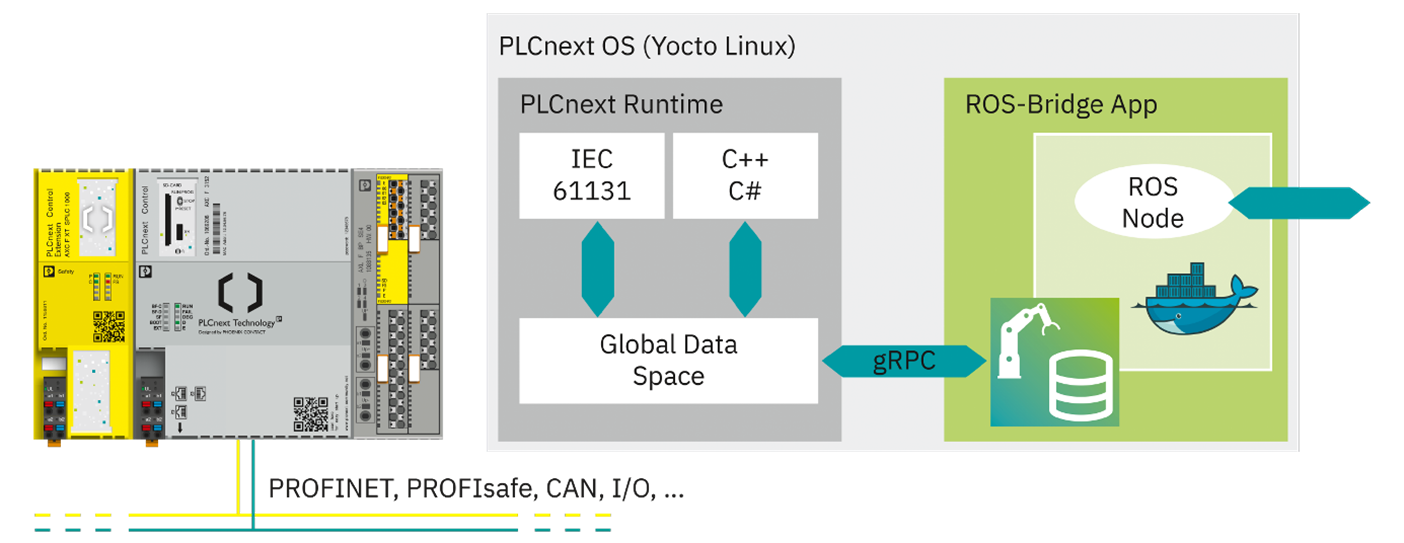
PLCnext Controls run on Yocto Linux, a real-time capable operating system that hosts the PLCnext Runtime. The Runtime manages deterministic process data and stores it in the Global Data Space (GDS).
Key architectural components :
- PLCnext OS: Yocto-based embedded Linux
- PLCnext Runtime (tasks, data handling, Axioline integration): Provides deterministic processing and the Global Data Space
- Global Data Space (GDS): Central storage for process variables accessible from PLC programs and system apps
- PLCnext Apps: Packaged software components that can be installed on the controller
PLCnext ROS Bridge
Concept
At its core, the PLCnext ROS Bridge is a custom ROS node with dedicated services running inside a Docker container, packaged as a PLCnext App. It provides a bidirectional communication gateway between the PLCnext Global Data Space (industrial side) and ROS topics (robotics side).
To illustrate this, consider a motor connected to the PLC via EtherCAT/FSoE or PROFINET/PROFIsafe. The motor, along with its associated safety functions, can be managed through simple PLC logic and represented by a set of variables. Depending on the implementation, these variables, such as setpoints, command velocities, etc., can be exposed to ROS. When the navigation stack publishes a command velocity, the ROS Bridge, as a subscriber to this topic, writes the received values to the corresponding variable on the PLC side. Likewise, information such as safety status or system state can be sent from the PLC to ROS and made available through a defined topic.
Commissioning Workflow
The ROS Bridge Node is generated through an automated code-generation process. This process is driven by the Interface Description File (IDF), which defines the PLC instance paths (variables) that should be exposed to ROS.
A typical build process performs the following steps:
- Building the ROS Packages
- Parse the IDF and generate the source code for the topic, publisher and subscribers
- Build the ROS Node
- Place the resulting binaries and gRPC dependencies into a Docker image with a minimal ros-core installation.
- Package the Docker image, together with required metadata, into a read-only PLCnext App.
The resulting App can be deployed to a PLCnext Controller using the Web-Based Management (WBM) interface. While it is possible to build everything in a local environment, the project is designed to be built via CI/CD. An example pipeline can also be found in the GitHub repository.
Runtime Behaviour
After installation, the App starts the container defined via the compose file. Inside this container, the generated ROS Node connects to the Global Data Space using the built gRPC client and then exposes the selected PLC variables via ROS publishers and subscribers. This enables ROS developers to integrate automation components, such as sensors, actuators, I/O modules, and fieldbus devices, into a ROS-based architecture through the GDS. Moreover, the Bridge sets up a set of services that enable users to read and write information at runtime.
Further Reading
- A Demo including a PLCnext Project can be downloaded from the PLCnext Store: https://www.plcnextstore.com/permalinks/apps/latest/60002172000613
- The Source Code can be found in the PLCnext GitHub Repository: https://github.com/PLCnext/PLCnext-ROS-bridge
More Information about the PLCnext Technology: